
Interactive Sales Configurators: Letting Buyers Customize Finishes Before They Sign
A finish swatch in a brochure tells a buyer what color a countertop comes in. It does not tell them what that countertop looks like inside their specific unit, against their chosen cabinetry, under the lighting conditions of the actual space.
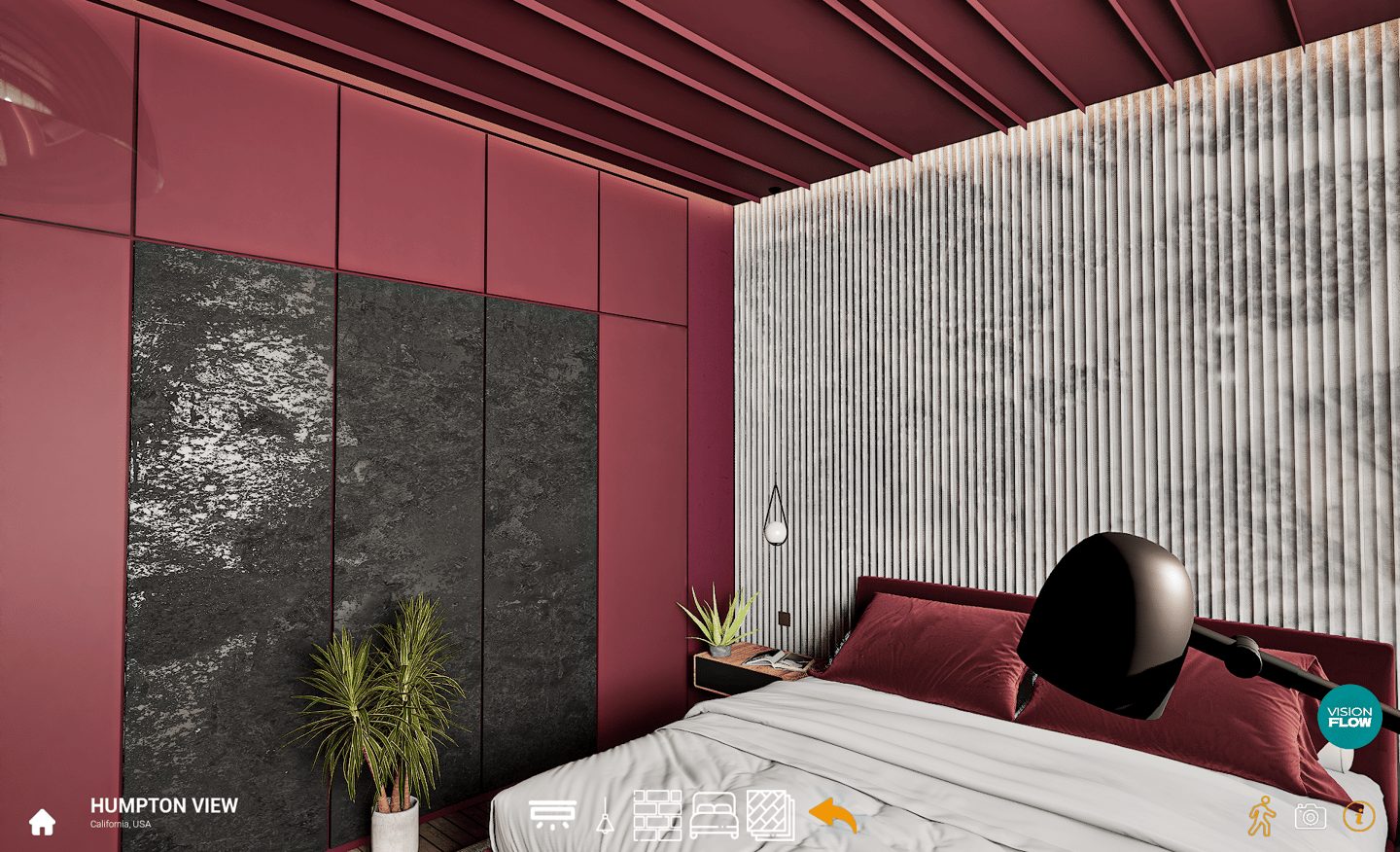
A finish swatch in a brochure tells a buyer what color a countertop comes in. It does not tell them what that countertop looks like inside their specific unit, against their chosen cabinetry, under the lighting conditions of the actual space.
That gap, between a selection on paper and a visualization of that selection in context, is where a significant portion of buyer hesitation lives at the deposit stage. A buyer choosing between two finish packages for a unit they haven't seen built yet is being asked to make a decision that feels permanent with information that is fundamentally incomplete. Interactive sales configurators exist to close that gap, not by adding more swatches to a brochure, but by letting a buyer see every combination they're considering rendered at full quality, in the actual space, before they sign.
What an Interactive Sales Experience Actually Does
Most developers think of a configurator as a selection tool. It is more accurately a decision tool. The distinction matters because it changes what the technology needs to do.
A selection tool presents options. A decision tool removes the uncertainty that makes choosing between them feel risky. The way a well-built configurator does that is not by showing thumbnails or flat material previews. It is by rendering every permutation, layout variant, palette combination, and exterior option at the same quality level as a hero still render, so that when a buyer toggles from the light oak package to the dark walnut, what they see is not a material chip updating on a schematic. What they see is the room changing.
That distinction is where most off-the-shelf configurator tools fall short, and it is the reason we build interactive digital twins as real-time environments rather than pre-baked image sequences. A pre-baked approach works for a small, fixed number of combinations: render every possible state in advance and swap between the stored images when a buyer toggles. It breaks down the moment the combination count grows, because the number of required renders scales multiplicatively. Three layout options, four palette packages, and two exterior finishes is already twenty-four combinations before accounting for any overlap between categories. A real-time environment does not have that constraint. The space is built once, the materials and configurations are applied dynamically, and the buyer sees every combination at full fidelity regardless of how many exist. That is the technical architecture that makes a genuinely useful configurator possible at development scale, and it is the approach we build to.
Why Removing Imagination From the Equation Matters at the Deposit Stage
The deposit stage is where a buyer is being asked to move real money toward something that doesn't exist yet. What they are paying for, in part, is the confidence that what gets built will match what they chose. The more of that picture they have to assemble in their own imagination, the more uncertain that confidence is, and the more an unresolved question can become a reason to wait.
Buyers who have seen their chosen finish combination rendered in full, inside their specific unit type, with their selected layout, are not imagining what they'll get. They've seen it. That is a fundamentally different psychological position from a buyer who selected a swatch and a floor plan separately and is now mentally trying to merge them into something coherent. The first buyer is confirming a decision. The second buyer is still making one, which means there is still a chance they change their mind or delay.
At the deposit stage, every round of hesitation has a cost. A buyer who needs another week to think about the finishes is a buyer who may encounter something that changes the picture before they sign. A configurator that lets them resolve every visual uncertainty in the sales meeting, or on their own time afterward, removes that window.
How Configurators Reduce Post-Sale Change-Order Disputes
Change orders in development sales rarely come from buyers who are being difficult. They come from buyers who selected something they couldn't fully picture and discovered, once construction was underway, that what they had imagined and what they had selected were not the same thing. By then, the materials are on order, the timeline is set, and every change carries a cost that feels punitive to a buyer who believes they are simply correcting a misunderstanding.
Picture a mid-rise development offering three finish packages across forty units. Without a configurator, selection happens against a physical sample board in a sales suite, a process where a buyer is assessing individual materials in isolation and mentally projecting how they'll read as a complete interior. Six months into construction, the first walk-through happens, and a portion of buyers discover that the combination they chose reads differently assembled than it did in samples. The developer is not at fault. The buyer is not acting in bad faith. But the dispute is real, the change-order requests follow, and the cost of resolving them, in time, in materials, and in the relationship with the buyer, is entirely avoidable.
A configurator does not eliminate all post-sale friction, but it eliminates the specific category of friction that comes from a buyer who did not actually know what they were selecting. When a buyer has seen their finish combination rendered at full quality in their unit before signing, the record of that decision is unambiguous. What was chosen is what was shown, and what was shown looked exactly like what is being built.
Integrating a Configurator Into Your Sales Process
A configurator is not a replacement for a sales suite or a digital sales process. It is a layer that makes both more effective at the moment that matters most, which is when a buyer is ready to choose but not yet ready to commit.
In a physical sales suite, a configurator runs best as a large-format interactive display, something a sales agent and a buyer can stand in front of together and work through in real time. The agent drives the session, the buyer responds to what they see, and the conversation moves from abstract discussion of options to direct reaction to visualized combinations. That is a materially different sales dynamic from presenting a sample board and asking a buyer to project, and it tends to compress the time between interest and commitment because the buyer's questions get answered visually in the room rather than taken home and left open.
Online, the configurator extends the sales suite experience into the buyer's own time and space. A buyer who spent thirty minutes in the suite exploring combinations will often return to the online version independently, at home, to revisit the options they were closest to and make the final call at a pace that feels like their own. That combination, a guided session in the suite followed by independent exploration online, consistently produces faster decisions than either channel alone, because the buyer arrives at commitment having approached the decision from two different angles and landed in the same place both times.
Typical Timeline and Required Inputs
A configurator project begins from the same inputs as any architectural visualization project: construction drawings, unit plans, and finish specifications for every package being offered. The more complete and accurate the drawings, the more efficiently the real-time environment can be built and the more precisely the material options can be applied.
Timeline varies with scope. A single unit type with three finish packages is a meaningfully different undertaking than a multi-tower development with five unit types and four packages each. As a general range, a configurator for a single unit type with a moderate combination count can be delivered within six to ten weeks of input materials being finalized and direction being locked. Larger scope projects are scoped individually. Starting earlier in the development cycle, before launch rather than after, consistently produces better results because the configurator can be built alongside the sales process rather than retrofitted into one that is already running.
FAQs
How Many Combinations Can Realistically Be Included?
The honest answer depends on the production architecture. A pre-baked image approach has a hard ceiling because every combination requires its own pre-rendered asset, and that number multiplies quickly. A real-time environment built as an actual interactive model does not have that ceiling in the same way. Material and configuration options are applied dynamically, so the number of combinations scales without requiring a proportional increase in production assets. For most development projects, the practical limit is not a technical one but a sales strategy one: how many options are genuinely useful to the buyer versus how many create decision fatigue. That is a conversation worth having during scoping.
Does a Configurator Replace the Need for Still Renders?
No, and the two serve different functions in the sales process. Still renders are built for reach: the hero image on a listing, the marketing deck, the launch campaign, the asset that introduces a project to the widest possible audience. A configurator is built for depth: the tool that helps a specific buyer who is already interested move from interest to commitment by resolving the visual uncertainty that is keeping them from signing. They are sequential tools. Stills create awareness and establish quality. The configurator closes the gap between awareness and deposit.
Can the Same Configurator Be Used Both in the Sales Suite and Online?
Yes, and this is the deployment model we recommend. A single real-time environment can be packaged for both contexts, as a large-format touch or display interface for the physical suite and as a browser-accessible version for online use, without requiring two separate builds. The experience is adapted for each context rather than rebuilt from scratch, which keeps the scope manageable and ensures the buyer encounters the same visual quality and the same combination options whether they are in the suite with a sales agent or at home making their final decision.
Scope Your Configurator
If your next launch involves multiple unit types, finish packages, or layout options and your current sales process is asking buyers to select from samples and imagine the result, that is a solvable problem. Reach out and let's scope what a configurator built for your specific project and sales timeline would take to deliver.
Decision-influencing visualization for architecture, real estate, and luxury brands.
Remote · Worldwide
© 2026 Vision Flow.
Vision flow studios is a wholly owned subsidiary of KHALIQ DESIGN STUDIOS Ltd Liability Co.

